Why I Replaced pip, Black, Flake8, and isort with Two Modern Python Tools (2026)

The Python community is changing faster today than at any point in the last 20 years. To keep pace with the changes in Python, developers need to change their Python tool use.
Comparison of Python Development Tools
I dumped pip, pylance, flake8, isort and Black formatter and configured my Python tools for a fun-filled future in 2026 with ruff, uv, and Anysphere Python.
| Old Tool | Purpose | Replacement | Why |
|---|---|---|---|
| pip | Dependency management | uv | Instant installs, modern environment manager |
| Black | Code formatting | Ruff Formatter | Black-compatible, Rust-fast |
| Flake8 | Linting | Ruff | 100× faster, auto-fixes, one binary |
| isort | Import sorting | Ruff (built-in) | Same behavior, no extra tool |
| Pylance | Language server for VS Code | Anysphere Python | Faster, AI-integrated, built into Cursor |
Note: I’m creating this Python workflow while working on FastOpp, a FastAPI starter for students building AI web applications. If you want to practice these modern Python tools yourself, FastOpp is built with uv and ruff from the ground up.
For the past year, I knew my editor configuration was not optimal. I just ignored digging into the setup despite Cursor’s annoying message to use Anysphere Python instead of the proven and stable Pylance language server. It was more fun to write Python code than to edit the configuration files for Python tools. Additionally, a quick assessment months ago, showed me that Pylance was better than Anysphere Python.
I like the Cursor editor and plan to stick with it in 2026. Since Cursor is committed
to Anysphere Python, I decided
to give it a try. Once I opened the settings.json file, I realized that
there were a lot more improvements that could make my life more fun.
pip versus uv
pip (and later pipenv or poetry) used to manage my dependencies.
They worked, but installation speed and dependency resolution were slow — especially in large projects.
uv, from Astral (the team behind Ruff), replaces pip and virtualenv entirely. It’s a single Rust binary that can:
- create virtual environments instantly,
- install packages in parallel,
- resolve dependencies deterministically,
- manage Python versions transparently,
- publish packages to PyPI with
uv buildanduv publish, - and manage different Python versions with
uv install --python <version>and works well with pyenv,
Typical workflow:
uv init myproject
uv add fastapi
uv run fastapi dev
It’s drop-in compatible with pip but 10 to 100× faster.
One major advantage of uv is its native support for pyproject.toml, Python’s modern standard for project configuration.
Unlike pip, which primarily uses separate requirements.txt files for dependency management (leading to inconsistent setups across projects), uv encourages using pyproject.toml for everything:
dependency management, build configuration, and tool settings.
This single file approach provides consistency across projects and makes configuration management much simpler.
Python Black Formatter versus Ruff Formatter
Black was my code formatter — it enforced consistent indentation, spacing, and line length. Ruff now includes a Black-compatible formatter built in:
ruff format .
It’s fully compatible with Black’s style (the “one true way” of formatting Python) but runs instantly, thanks to Rust.
I removed the Black formatter extension in Cursor and set Ruff as my default formatter in settings.json.
Optimzing a pyproject.toml Template for ruff
I’ve created a reusable pyproject.toml that preloads my Ruff configuration.
Since uv doesn’t yet have a template command, I copy this file manually into new projects.
It defines:
- line length
- rule families (
E,F,I,B,UP,SIM,C4) - formatting and import-sorting behavior
Example snippet:
[tool.ruff]
line-length = 120
select = ["E", "F", "I", "B", "UP", "SIM", "C4"]

[tool.ruff.format]
quote-style = "double"
indent-style = "space"
Then I just run:
uv sync --dev
ruff check . --fix
ruff format .
This is my full pyproject.toml template.
[project]
name = "your_project"
version = "0.1.0"
description = "Modern uv + Ruff Python project"
readme = "README.md"
requires-python = ">=3.11"
dependencies = []

[project.optional-dependencies]
dev = ["ruff"]

[tool.ruff]
line-length = 120
target-version = "py311"
select = ["E", "F", "I", "B", "UP", "SIM", "C4"]
fix = true

[tool.ruff.format]
quote-style = "double"
indent-style = "space"
line-ending = "lf"
skip-magic-trailing-comma = false

[tool.ruff.isort]
combine-as-imports = true
force-sort-within-sections = true
I keep the file in /Users/craig/.config/uv/templates/ruff/pyproject.toml.
To use it, I do:
uv init my_project
cd my_project
cp ~/.config/uv/templates/ruff/pyproject.toml .
Hopefully, uv will add the ability to start a new project with a template in future.
Flake8 versus Ruff
Flake8 was my linter for over a decade. It’s great.
It runs static checks (E, F, W codes) to catch style issues, undefined variables, and logical mistakes.
Flake8 can be extended with plugins like flake8-bugbear, flake8-comprehensions, and flake8-docstrings.
The downside?
- Dozens of small Python plugins to install
- Slow runtime on large projects
- No auto-fix
Ruff, written in Rust, replaces all of that in one binary.
It implements nearly all Flake8 plugins natively — B for bugbear, C4 for comprehensions, UP for pyupgrade, and more.
It’s 100× faster and can fix issues automatically:
ruff check . --fix
I uninstalled Flake8 and now rely entirely on Ruff for linting. Similar to leaving Pylance, it’s a bit sad to move off old tools. However, I’m excited to really focus on the new tools and learn more about the capability of ruff over time.
From isort to Ruff’s built-in import sorter
isort automatically groups and alphabetizes imports:
# before
import sys, os
from requests import get
to
# after
import os
import sys

from requests import get
Ruff re-implements isort’s logic internally — same rules, same grouping, same configuration style.
By enabling Ruff’s "I" rule family (and [tool.ruff.isort] in pyproject.toml), imports are fixed automatically during linting:
ruff check . --fix
That means no need for a separate isort install or pre-commit hook. I uninstalled the
isort VSCode extension.
Pylance versus Anysphere Python
Pylance is Microsoft’s language server for Python — the component that powers IntelliSense in VS Code. It provides:
- autocompletion,
- type inference,
- inline documentation,
- “go to definition” navigation,
- and static type checking (via Pyright under the hood).
Although Pylance is superior to Anysphere Python, I switched to Anysphere Python and replaced Pylance as the language server. In actual use, the advantages of Anysphere Python over Pylance are not immediately obvious. However, I’m hoping it will get better in 2026. I made the switch at the end of 2025 because Anysphere Python may have better context-aware code generating and editing in the future. As I’ve started to use the Cursor Plan mode, I’m hoping that Anysphere Python will help. In Cursor, I uninstalled the Pylance extension.
Switching from Pylance to Anysphere Python is the most controversial change I made. Dumping pip, flake8, isort, and Black formatter are not as controversial because uv and ruff are superior to the older tools.
Improving Cursor settings.json for Python in 2026
Finally, I updated my editor configuration (settings.json) to remove old formatters and linters and point to Ruff as the default Python formatter.
I’ll include those specific settings in the blog itself, but here’s the key line:
"[python]": {
    "editor.defaultFormatter": "charliermarsh.ruff",
    "editor.formatOnSave": true
}
In the View -> Command Palette, search for Preferences: Open User Settings (JSON).
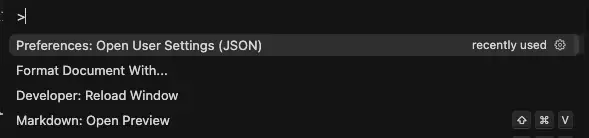
Here is my full settings.json file:
{
  "git.autofetch": true,
  "git.enableSmartCommit": true,
  "git.confirmSync": false,

  "[dart]": {
    "editor.formatOnSave": true,
    "editor.formatOnType": true,
    "editor.rulers": [80],
    "editor.selectionHighlight": false,
    "editor.suggest.snippetsPreventQuickSuggestions": false,
    "editor.suggestSelection": "first",
    "editor.tabCompletion": "onlySnippets",
    "editor.wordBasedSuggestions": "off"
  },

  "workbench.startupEditor": "none",
  "editor.minimap.enabled": false,
  "window.zoomLevel": 4,
  "editor.fontFamily": "'Fira Code', 'Droid Sans Mono', 'monospace', monospace, 'Droid Sans Fallback'",
  "editor.fontSize": 20,

  "editor.defaultFormatter": "esbenp.prettier-vscode",
  "editor.formatOnSave": true,
  "editor.inlineSuggest.enabled": true,
  "editor.inlineSuggest.suppressSuggestions": false,
  "editor.suggest.showInlineDetails": false,
  "editor.quickSuggestionsDelay": 500,
  "editor.accessibilitySupport": "off",

  "[python]": {
    "editor.defaultFormatter": "charliermarsh.ruff",
    "editor.formatOnType": true,
    "editor.formatOnSave": true
  },

  "prettier.disableLanguages": ["python"],

  "[html]": { "editor.defaultFormatter": "esbenp.prettier-vscode" },
  "[json]": { "editor.defaultFormatter": "esbenp.prettier-vscode" },
  "[javascript]": { "editor.defaultFormatter": "esbenp.prettier-vscode" },
  "[javascriptreact]": { "editor.defaultFormatter": "esbenp.prettier-vscode" },
  "[typescriptreact]": {
    "editor.defaultFormatter": "vscode.typescript-language-features"
  },
  "[css]": { "editor.defaultFormatter": "esbenp.prettier-vscode" },

  "security.workspace.trust.untrustedFiles": "open",
  "remote.autoForwardPortsSource": "hybrid",

  "dart.previewFlutterUiGuides": true,
  "dart.previewFlutterUiGuidesCustomTracking": true,
  "dartImport.fixOnSave": true,
  "dartImport.showErrorMessages": false,
  "dartImport.showInfoMessages": false,
  "dart.flutterHotReloadOnSave": "manualIfDirty",

  "emmet.includeLanguages": { "django-html": "html" },

  "ruff.args": ["--line-length=120", "--ignore=I001"],
  "ruff.enable": true,
  "ruff.nativeServer": "on",
  "ruff.organizeImports": true,
  "ruff.fixAll": true,
  "ruff.exclude": ["venv", "__pycache__", "migrations"]
}
I am still using the prettier formatter for other languages such as HTML, JavaScript, CSS, Markdown. I’m only using ruff as the formatter for Python. Additionally, I have old Dart settings that I need to review and potentially improve. I intend to use Dart with Flutter to build frontend examples for FastOpp.
Result
After switching:
- No more managing 4+ Python tools
- No redundant dependencies
- Instant linting, formatting, and import cleanup
- uv replaces pip + venv, faster and cleaner
- Cursor’s AI works directly with my Python environment (via Anysphere)
Everything just feels faster — from creating projects to saving files.
Try this setup with FastOpp
FastOpp is perfect for learning modern Python development patterns.
git clone https://github.com/Oppkey/fastopp.git
cd fastopp
uv sync
The tooling and flow was built and tested with FastOpp.
Reflection
The Python ecosystem has evolved dramatically — the new Rust-based tooling from Astral (Ruff, uv) makes Python development feel fast. I saw an interview of one of the founders of Anysphere, the makers of Cursor. He said that they wanted to make development fun and that fast was fun. I agree with this. Speed and the quest for efficiency are really powerful ways to make life more fun. Additionally, I removed almost a dozen Python-only dependencies and simplified my workflow to just Ruff + uv.
Dig into your editor settings and make Python development as fun as possible. You’ll be on track to make 2026 your most exciting year of Python development in decades.