Introduction
In this article, we break down Python’s core data types and show how they behave in real code: lists, tuples, sets, and strings.
You’ll learn:
- The difference between mutable vs immutable objects
- Why tuples can’t be changed but lists can
- How tuple unpacking makes code cleaner and more readable
- How sets remove duplicates automatically
- How to use union, intersection, and difference on sets
- How strings behave like immutable sequences
- How type checking with mypy can catch data type mistakes
- Why strings behave like immutable sequences
- How type checking with mypy can catch data type mistakes
Full free course called Industry Projects with Python covers Python iterables and much more. Full code for each section is available for download.
Before we get into the “visual” part, here’s the quick mental model you should keep in your head:
LIST — A list is ordered, you can mutate it, and duplicates are fine.
- ✅ order
- ✅ mutable
- ✅ duplicates
TUPLE — A tuple keeps order and duplicates—but you can’t change items.
- ✅ order
- ❌ mutable
- ✅ duplicates
SET — A set drops duplicates and isn’t guaranteed to be ordered.
- ❌ order (no guarantee)
- ✅ mutable (you can add/remove items)
- ❌ duplicates (unique only)
In the code below, we build a “staff party” guest list to make the behavior obvious: you build collections of “people,” render them, then change the data structure and see what changes in output. This is explicitly aimed at “learning about iterables” and using Flet as the display layer.
How To Use

You’re implementing a small demo that:
- Creates a handful of “items” (images like Corey/Jerry/Kristi/Matt/Susan).
- Stores those items in a list, a tuple, and a set.
- Iterates over each collection (because they’re iterables) and adds/renders each item.
- Demonstrates the key behaviors:
- Lists allow item reassignment (mutation).
- Tuples reject item reassignment (“does not support item assignment”).
- Sets remove duplicates and don’t promise stable ordering.
- Set algebra (&, |, -) gives intersection/union/difference.
Key “moving parts” (classes / methods / operators)
Core Python concepts
- list[T]: ordered, mutable, duplicates allowed.
- tuple[T, …]: ordered, immutable, duplicates allowed.
- set[T]: unique elements, iteration order not guaranteed.
- for x in iterable: iteration works across all three.
Set operations:
- a & b (intersection): elements in both sets
- a | b (union): elements in either set
- a - b (difference): elements in a that are not in b
Flet concepts (for the “visual” angle)
- ft.Image(…): creates a UI control you can render.
- page.add(control): appends controls to the page.
- ft.run(main): runs your app, calling main(page).
The “visualization” is simple on purpose: create a collection of UI controls, iterate it, and call page.add(…) for each item.
How to run it (practical workflow)
We use uv and run Flet locally. A typical setup looks like this:
- Ensure you have Python installed.
- Install dependencies with
uv. - Put your images in an
assets/folder (or configure paths accordingly). - Run the Flet app locally.
Code Example
Below is a working example. The full code is available as a zip file in Chapter 13 of the course. It includes images.
If you have a folder of images (like assets/cory.png, assets/jerry.png, etc.), you can render the result by iterating a collection of ft.Image controls and adding them to the page.
import flet as ft

def main(page: ft.Page) -> None:
    # In the original demo, the "people" are images (iterables of controls).
    cory = ft.Image(src="cory.png", height=120)
    jerry = ft.Image(src="jerry.png", height=120)
    kristi = ft.Image(src="kristi.png", height=120)
    matt = ft.Image(src="matt.png", height=120)
    susan = ft.Image(src="susan.png", height=120)

    party_set: set[ft.Image] = {kristi, cory, jerry, kristi}   # duplicates collapse
    party_set2: set[ft.Image] = {matt, susan, jerry}

    # Show "difference" visually: who is only in party_set?
    difference_set: set[ft.Image] = party_set - party_set2

    page.add(ft.Text("Iterable Staff Party", size=32, weight=ft.FontWeight.BOLD))
    for person in difference_set:
        page.add(person)

ft.run(main)
Why this works as a learning tool:
- You’re forced to iterate (for person in difference_set) because that’s how you “render many items” from any iterable.
- You can see duplicates vanish when switching from list/tuple to set (the transcript explicitly calls out that only one “Kristi” remains).
- You hit the tuple immutability wall immediately if you try to assign into a tuple (“does not support item assignment”).
That’s the core takeaway: pick the iterable based on the rules you need—mutation, ordering, and uniqueness—and then let iteration be the common “consumption interface” across all of them.
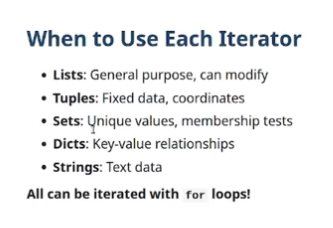
Summary/Cheat Sheet
This summary slide is from the course video: Python Iterables Explained Visually (Lists, Tuples & Sets).